Difference between revisions of "Importer Schedules Page Manual 3.0"
Jump to navigation
Jump to search


| Line 65: | Line 65: | ||
From the list, there are 3 available Actions: | From the list, there are 3 available Actions: | ||
<br /> | <br /> | ||
| − | [[File:ImporterSchedulesActions_react.png| | + | [[File:ImporterSchedulesActions_react.png|center|200px]] |
<br /> | <br /> | ||
<br /> | <br /> | ||
| Line 73: | Line 73: | ||
Download: download of the XML file.<br /> | Download: download of the XML file.<br /> | ||
<br /> | <br /> | ||
| − | Example of the preview of the XML:<br /> | + | Example of the preview of the XML message:<br /> |
[[File:ImporterSchedules2_react.png|center|600px]] | [[File:ImporterSchedules2_react.png|center|600px]] | ||
<br /> | <br /> | ||
Revision as of 09:31, 29 December 2025

Access to this menu in Betools through:  Video On Demand > Content Workflow > Importer > Importer Schedules
Contents
In this section it is possible checks if the XML file upload status is success or error.
Blocks
Importer Schedules

| Field | Description | Restrictions |
|---|---|---|
| ID | Internal ID. | ReadOnly |
| Creation Date | Creation date of the schedule. | ReadOnly |
| Owner | MiB user creator. | ReadOnly |
| Remote Folder Id | ID of the Remote Folder. | ReadOnly |
| Subfolder | Name of the mezzanine folder. | ReadOnly |
| XML File | Name of the XML fIle that contain the mezzanine informations. | ReadOnly |
| Status | Success or Error. | ReadOnly |
| Job Id | ID of the Job. | ReadOnly |
| Source | Controls the access and visibility of this item for other operators. Only operators with rights over this source or its children will be able to see it. | ReadOnly |
Actions
From the list, there are 3 available Actions:

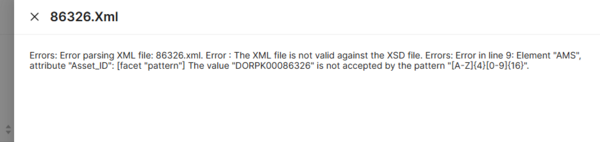
Preview: access to the details of the message.
Retry: retry that importing process.
Download: download of the XML file.
Example of the preview of the XML message:

