Difference between revisions of "Catalog Exporter V2 Manual 5.0"
| (34 intermediate revisions by 3 users not shown) | |||
| Line 1: | Line 1: | ||
| + | [[Category: Manual]] [[Category: Instances]] [[Category:MIB React]] [[Category:GVP 25.12]] | ||
{{Menu|Message= [[File:InstancesIcon.png|middle|30px]] '''Instances > Settings > Catalog Exporter V2'''}} | {{Menu|Message= [[File:InstancesIcon.png|middle|30px]] '''Instances > Settings > Catalog Exporter V2'''}} | ||
| Line 4: | Line 5: | ||
In this page you can review the details of exporter status for each of the instances you have access to and force catalog generation<br /> | In this page you can review the details of exporter status for each of the instances you have access to and force catalog generation<br /> | ||
<br /> | <br /> | ||
| − | [[File: | + | [[File:CatalogV2ReactPage.png|1000px|center|thumb|Catalog Exporter V2 page]] |
<br /> | <br /> | ||
<br /> | <br /> | ||
Expanding one of the instances, It displays the Catalogs in process of Exportation, waiting to be exported (on queue), and already exported catalogs of the selected instance. This opened section is composed by columns. | Expanding one of the instances, It displays the Catalogs in process of Exportation, waiting to be exported (on queue), and already exported catalogs of the selected instance. This opened section is composed by columns. | ||
<br /> | <br /> | ||
| − | [[File: | + | [[File:catalov_v2_expanded_instanceReact.png|1000px|center|thumb|Intance 25 Section]] |
These columns represent: | These columns represent: | ||
* '''ID''': Composed by the Instance ID and Catalog generated ID. | * '''ID''': Composed by the Instance ID and Catalog generated ID. | ||
| Line 23: | Line 24: | ||
* '''ACTIONS''': The possible action on catalog (I.E: Seeing the details). | * '''ACTIONS''': The possible action on catalog (I.E: Seeing the details). | ||
<br /> | <br /> | ||
| + | |||
== Buttons == | == Buttons == | ||
| + | '''CANCEL'''<br /> | ||
| + | The [[File:cancel.png|middle|30px]] will stop the catalog generation instantly. | ||
| + | * [[File:CatalogV2CancelModal.png|middle|500px]] | ||
| + | <br /> | ||
| + | <br /> | ||
| + | '''DETAILS'''<br /> | ||
| + | The [[File:CatalogV2DetailsButton.png|middle|30px]] button displays sections of the components involved in exportation and each step and status of these components. | ||
| + | * Grouped View [[File:CatalogV2DetailsOpen.png|middle|500px]] | ||
| + | <br/> | ||
| + | * Ungrouped View [[File:CatalogV2DetailsUngroupedOpen.png|middle|500px]] | ||
| + | <br /> | ||
| + | <br /> | ||
| + | '''INFORMATION'''<br /> | ||
| + | The [[File:CatalogV2InformationButton.png|middle|70px]] button displays an more precise information about the step, in case of an error it's displayed too. | ||
| + | * Step Example [[File:CatalogV2DetailsPostmanOpenDInformationBlurred.png|middle|500px]] | ||
| + | <br/> | ||
| + | * Error Example [[File:CatalogV2ErrorInfo.png|middle|500px]] | ||
| + | <br/> | ||
| + | <br /> | ||
| + | <br /> | ||
| + | '''VIEW CATALOGS'''<br /> | ||
| + | The Catalogs tab displays the Catalogs and permits the activation of It. | ||
| + | * [[File:CatalogV2OpenViewCatalogsBlurred.png|middle|500px]] | ||
| + | * The [[File:CatalogV2ActivateButton.png|middle|30px]] button, activates the the catalog. | ||
| + | <br /> | ||
| + | <br /> | ||
| + | '''REFRESH DATA'''<br /> | ||
| + | Use the [[File:RefreshNew_3.png|middle|30px]] button so the status about the catalog exporter process from an specific instance is refreshed. | ||
| + | <br /> | ||
| + | <br /> | ||
| + | '''EXPORT NOW'''<br /> | ||
| + | Use the [[File:ExportNow3.png|middle|70px]] button up the pop up to config a new catalog generation for an instance. | ||
| + | * [[File:catalog_v2_export_now_pop_up.png|middle|500px]] | ||
| + | <br /> | ||
| + | <br /> | ||
Latest revision as of 10:58, 31 December 2025

Access to this menu in Betools through:  Instances > Settings > Catalog Exporter V2
Instances
In this page you can review the details of exporter status for each of the instances you have access to and force catalog generation

Expanding one of the instances, It displays the Catalogs in process of Exportation, waiting to be exported (on queue), and already exported catalogs of the selected instance. This opened section is composed by columns.

These columns represent:
- ID: Composed by the Instance ID and Catalog generated ID.
- NAME: Name of the Catalog.
- LANGUAGE: Language used.
- STATUS: Current Status of the Exportation.
- Current Version: The current version.
- ENQUEUED AT: The moment the exportation entered the queued.
- START AT: The moment the exportation started to be processed.
- LAST UPDATED: When this exportation was last updated.
- PRESTIGES: Number of prestiges catalog were sucessful installed.
- ERROR: Number of Errors during the process.
- ACTIONS: The possible action on catalog (I.E: Seeing the details).
Buttons
CANCEL
The  will stop the catalog generation instantly.

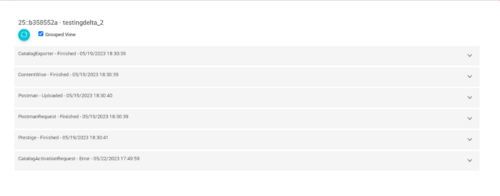
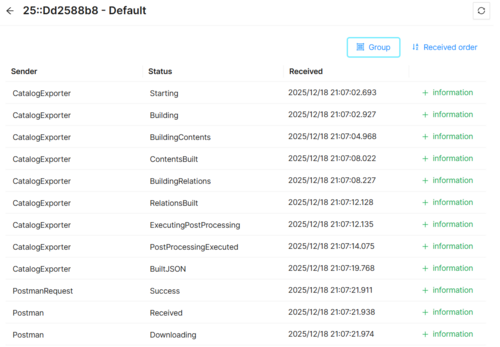
DETAILS
The  button displays sections of the components involved in exportation and each step and status of these components.
- Grouped View

- Ungrouped View

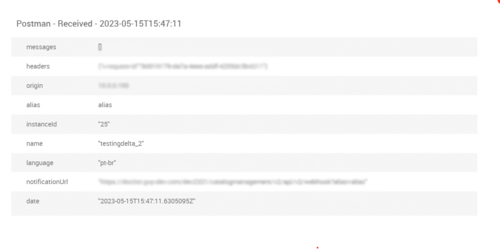
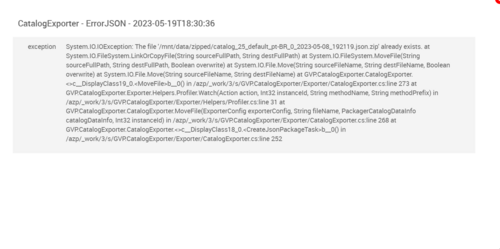
INFORMATION
The  button displays an more precise information about the step, in case of an error it's displayed too.
- Step Example

- Error Example

VIEW CATALOGS
The Catalogs tab displays the Catalogs and permits the activation of It.
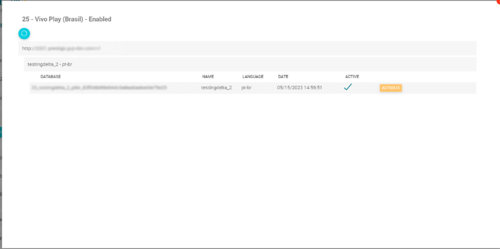
- The
 button, activates the the catalog.


REFRESH DATA
Use the  button so the status about the catalog exporter process from an specific instance is refreshed.
EXPORT NOW
Use the  button up the pop up to config a new catalog generation for an instance.

