Difference between revisions of "Live Channels Page Manual 3.0"
Aldo.moreira (talk | contribs) |
Aldo.moreira (talk | contribs) |
||
| Line 376: | Line 376: | ||
* Use the [[File:AddNew.png|middle|120px]] button and a dialog will be open so you will be able to select the language to be saved. | * Use the [[File:AddNew.png|middle|120px]] button and a dialog will be open so you will be able to select the language to be saved. | ||
* Now select the subtitle and audio languages. | * Now select the subtitle and audio languages. | ||
| − | * Once finished, save changes by using the [[File:Save3.png|middle| | + | * Once finished, save changes by using the [[File:Save3.png|middle|70px]] in the lives channel page and the record will be associated.<br /> |
* Use the [[File:DeleteRed3.png|middle|30px]] button to remove the selected item. | * Use the [[File:DeleteRed3.png|middle|30px]] button to remove the selected item. | ||
<br /> | <br /> | ||
Revision as of 19:19, 29 December 2025

Access to this menu in Betools through:  Live > Live Channels
This menu allows you to review all the Live TV Channels and the settings associated to them.
Blocks
Live Channel

| Field | Description | Restrictions |
|---|---|---|
| Name | Internal name. Not displayed in end user apps | ReadOnly |
| Title | Title to be displayed in end user applications | -
|
| Call Letter | Channel Call Letter | ReadOnly |
| Channel Number | Default dial number of the channel. Take into account that if the channel belongs to a channel map, the number of that channel in the channel map will be used instead | - |
| Reference ID | Internal ID. It is the reference of the channel in the EPG file. | ReadOnly |
| Description | Description to be displayed to the user | - |
| Source | Controls the access and visibility of this live channel for other operators. Only operators with rights over this source or its children will be able to see it. | ReadOnly |
| Instance | Instance where the live channel belongs to. | ReadOnly |
| Active | Flag that allows to activate / deactivate a channel | - |
| Requires PIN | Flag that indicates if the Live Channel is Adult content or not. | -
|
| Provider Channel | Allows selecting an existing VOD related channel. | - |
| LXD Channel | Allows selecting an existing channel to L7D related. | - |
| Transparent Distributor (for reporting) | Allows selecting an existing distributor for reporting. | - |
| Distributor (for concurrency) | Allows selecting an existing distributor from GVP_MOVIES_TRANSPARENT_PROVIDERS table. | - |
| Timeshift | Allows to enable/disable Mediaroom Timeshift functionality in this channel. | ReadOnly.
Mediaroom Only |
| PPV | Indicates if it is a Pay Per View channel | - |
| Pending catchup sync | Read only field used by the catchup agent in the Catchup generation process. If set to true, means that the Live Channel is pending a catchup sync process | Read only |
| Pending catchup device availability sync | Read only field used by the catchup agent in the Catchup generation process. If set to true, means that the Live Channel is pending a catchup device available sync process, because some Live Channel device availability settings have been modified |
|
| Last Catchup Sync Date | Date of the last catchup sync | Read only |
| Resource Id | External Resource ID used for External Live OTT, for handling authorization requests. | - |
| RestartTV Window Duration | Indicates the time in the past (in hours) that the client can perform RestartTV to play again past programs. Default value is 0. If set to 0, means no restart tv window. | -
|
| Channel Type | Type of channel. GLF defines an optional attribute for the channels, which is the "t" attribute, to define the channel type.
|
- |
| IPTV Quality | Reference quality for QoE/QoS diagnostics. | - |
| App URL | Allows to configure the URI for launching the application | Warning is shown if the Channel Type = App and App URL is left empty. |
| Has Subtitle | Checkbox for operators to inform if the live channel has subtitles or not. |
|
| FOX Channel Mapping | Allows selecting an existing channel maps for FOX distributor. | ReadOnly.
Only enabled when Transparent Distributor is FOX. |
| DASH supported in VSPP | Enables DASH streams (live and VoD) in VSPP supported services. |
|
| Advanced CDN Services | Allows signal to devices whether the pause is available through CDN for this channel or not. |
|
Feature Settings
This block shows the feature settings of the channel

| Field | Description | Restrictions |
|---|---|---|
| Active | ||
| Requires Pin | ||
| Channel Type | Enum (Live, PPV, App, Promotional, Mosaic, IPTV) | |
| App URL | ||
| FUT | ||
| Playlist Experience | To indicate if the LiveChannel is a Playlist Channel | |
| Fast | To indicate if the LiveChannel is a FAST Channel | |
| Virtual | Indicates if the LiveChannel is a Virtual Channel | |
| Kids | Indicates if the LiveChannel is a children's channel | |
| Preferent | Indicates if the LiveChannel is a preferent channel. If it's true the channel will be available at second home | |
| Blacklist | If it's true the channel will not appear in the list of channels most watched by the user | |
| Homezone Blocked | To indicate if channel is blocked outside Homezone depending on the users package. | |
| Homezone Required | To indicate to the device if stablish a homezone is required or not for live playback for a specific channel | |
| External | ||
| Ads Enabled | Indicates if the channel allows personalised advertising | |
| Timeshift | Read Only | |
| Maximum minutes behind live | 0 means disabled | |
| PPV | ||
| Hidden | ||
| Fox Channel Mapping | ||
| Is Latency Important? | ||
| Is National Channel | ||
| Co-Watching | ||
| Catalog AVOD URL | URL to download AVOD content aired on the FAST channel |
Jobs Workflow
This block shows the detail of the works related to the channel

Catchup Pod Settings
In this block you can manage the Catchup settings associated to this channel, used for configuring the Catchup service.

You can configure the following fields:
- Catchup POD Settings: Allows you to select the specific POD Settings to the Live Channel. You can define new POD settings in the POD Settings page
- Catchup Enabled: Defines if the Catchup service is enabled or not for that Live Channel.
- Override Default Settings: Configures if you want to configure specific Catchup settings in this Live Channel that will override the Catchup settings defined at Instance level.
- Window duration: In hours, represents the length of catch up window, this is, the number of hours that will be kept recorded in the past.
- Window Start: In minutes, represents the time after the end of the program where the catchup movie will become available:
- 0 when the program finished,
- N the number of minutes after which the program has ended.
- Start Padding: In seconds, represents the start padding that will be added to the start time of the program to ensure that the whole program is recorded.
- End Padding: In seconds, represents the end padding that will be added to the end time of the program to ensure that the whole program is recorded.
Once you have finished with the modifications, save changes with the  button in the live channel page.
Device Type Availability
This blocks allows you to manage the availability of this Live TV channel and its servcies associated (Playback, Catchup, Startover, RestarTV) in the different device types in the instance it belongs to.

The block has been totally refactored in MIB 3.0, with the objective of simplifying the operation. Each row allows you to control the availability of the Live channel services for each device type of its Instance. You can also configure the Quality that will be available for each device. The services that you can configure are:
- Enable Playback: controls if the Live OTT playback of that live channel is enabled for that specific device. If it is disabled, the user wont be able to play this live channel in that specific device type.
- Enable Catchup: controls if the playback of 7UD catchup contents of that live channel is enabled for that specific device type.
- Enable Startover: controls if the playback of 7UD catchup contents of that live channel is enabled for that specific device type.
- Enable RestarTV: controls if the playback of 7UD catchup contents of that live channel is enabled for that specific device type.
Configure service availability for a device type
The sliding button allows you to enable/disable that specific service. It has 3 different positions:
 The devices contained are enabled.
 The devices contained are disabled.


Once finished, apply changes using the button in the VOD Channel page.
Configure service quality for a device type

The quality selector allows you to configure the quality that will be available for an specific level. Once finished, apply changes using the button in the VOD Channel page.
Adding a new device type
- Use the
 button and multiple selection window will open to select some device types from the instance to be added.
 - Select the device types you want to add and press the
 button.
 - Now configure the service availability for those device types and the quality and press the on the Live Channel page to apply changes.

Subscription Info
This block shows the information of the subscriptions associated with the channel.

Edit a subscription
- Click on the value in the Id field
 to open the Subscription page in a new tab: https://wikis.tid.es/gvp-dev/index.php/Subscription_Page_Manual_3.0#Edit.

Images
This block allows you to manage the images associated to the live channel and the information associated, such as the Type and Quality.
Also, the preview of all the associated images is displayed. It's possible to select/deselect all associated images and remove them.

Add new images
- Use the
 button a new form will be open with a new form.

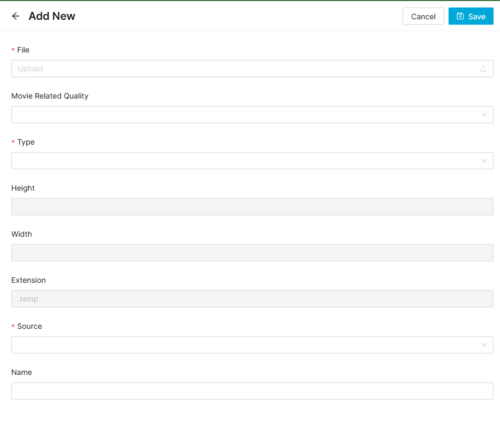

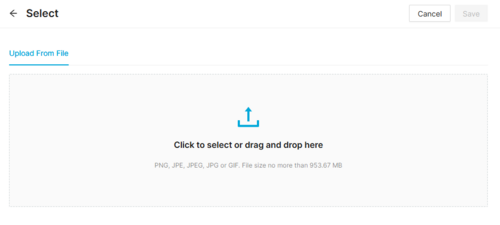
- Then click the
 button on File field, a dialog will be open so you will be able to select the image to be uploaded.


- Now select the subtitle language and a name for the subtitle.
- Once finished, save changes by using the in the live channels page and the subtitle will be associated.
Add existing images
- Click the button and a dialog will open to select and existing image.
- Once finished, save changes by using the in the live channels page and the image will be associated.
Remove images
- Use the
 button to remove the association of a image from the movie .
 - Once finished, save changes by using the in the live channel page. This will not delete the image file from the platform. In order to delete the image, you will have to go to the Images Page.

Preview images
- By clicking in the
 button in each image, you can access to the image preview.


Download Images
By clicking in the  button in each image, you can download the image.
Audio and Subtitles
This block allows defining specific default languages selection for audio and subtitle. In case it's not set default per instance is considered. It only applies when users don't define their own preferences.

Add new record
- Use the
 button and a dialog will be open so you will be able to select the language to be saved.
 - Now select the subtitle and audio languages.
- Once finished, save changes by using the
 in the lives channel page and the record will be associated.
 - Use the button to remove the selected item.
Movies Criteria
This blocks allows you to select those VOD Contents (Movies, Series, Seasons and Episodes) that will be available inside this channel. To do this, the operator is able to define a set of rules, called Content Criteria Filters that will be evaluated during the Catalog Exporter process. All the Movies that match the specified filters will be linked to this VOD Channel.

Create new Content Criteria
It is really easy to create a new content criteria. You only have to build an expression by combining filters that will be evaluated to select the movies that match. The expression will be composed of one or more Groups each of them composed of one or more filters and the AND/OR relationship between them. Example:
Group1 = FilterA OR FilterB
Group2 = FilterC
Content Criteria = (Group1 AND Group2) = ((FilterA OR FilterB) AND FilterC)
- First add a new Group by clicking on the
 button.
 - Then add a new Filter by clicking on the
 button.
 - Select the type of filter from the list and fill the value for the filter. There are multiple filter types available and you can combine them as you want. Some examples of filters are:
- Commercialization Type
- Content Category
- Distributor ID
- Episodes by SeasonID
- Episodes by SearieID
- Genre ID
- Instance ID
- Last X days
- Movie Type
- Person Role
- etc.
- Continue adding as many filters as desired to build the first group expression.
- When you have added all the filters for the first group, select the operator (AND / OR) that will be used to link the filters for that group.
- Now you can add a new group, go back to 1. When you have finished adding groups, select the operator (AND / OR) between the different groups.


Once finished you can continue to the Highlights section, Orders section or Preview. Save changes at anytime by clicking on the in the VOD Channel page.
Highlight content
In the new content criteria, you can select some content to be highlighted. This highlighted content will be returned first when ordering the Default order is selected in the VOD channel. To do it, follow this steps:
- First click on the button to select movies to be highlighted.
- A page will open allowing you to search over the different movies you have access to. Important: You will be able to select ANY movie from the list of movies you have access to. The movie will be returned independently on the Content Criterias that you have defined in the block. Of course, if duplicated, the content will be returned only once, highlighted.
- Select one or more contents to be added. It is important to understand that the highlighted contents will be ordered depending on the order they are added. So add first the contents you want to be highlighted first. In the current version of this block, it is not available the [manual ordering of highlights], it will be added in future versions.
- Save changes at anytime by clicking on the in the VOD Channel page.

Define default ordering and maximum number of results
In the new content criteria, you can also define the maximum number of results to be returned and the behavior of the default ordering and select what ordering criteria should be applied for those contents.
- First click on the Default Order section
- Select the primary ordering criteria from the list available:
- Duration : Ordereed by movie duration value
- Editorial Rating : Ordered by movie Editorial Rating value
- Episode / Season Order: Ordered by movie.order value
- Most Rated: Ordered by rating value
- Popularity: Ordered by views value
- Release Date: Ordered by movie release date value.
- You can also select a secondary ordering criteria, in case some movies tie the primary order criteria
- Once a primary order has been selected, that option won't be available for secondary order
- It is also possible to define a maximum number of results to be returned by the criteria. By default, it is set to 0 (unlimited).
- Save changes at anytime by clicking on the in the VOD Channel page.

Content Criteria Preview
At any time you can go to the Preview tab and evaluate the results of the Content Criteria.

CDN Lives
This block is read only mode and shows the linked CDN Lives for such live channel.

Media Services
This block allows to manage the different Media Services that are associated to this Live Channel.

Add new Media Services
- Click the button and a new row will be added so you can create new Media service
- Fill in all the required information for the Media Service
- Once finished, save changes by using the in the Live Channel page and the Media Service will be created and associated to the Live channel.
Remove Media Service
- Use the button to remove the association of a Media service with this channel .
- Once finished, save changes by using the in the Live Channel page. This will delete the Media Service.
Xpvr
This block allows configure rPVR and cPVR features.

You can configure the following fields:
- Dvr: Allows Enable local and remote recordings for this channel.
- Cpvr: Allows enable cloud recordings for this channel. If channel type is PPV, operator cannot enable cPVR.
- Past Persistence: Period (in hours) that past EPG information will be kept in VRM system. Usually this value should match the size of the rolling buffer for that channel in the recorder.
- Future Persistence: Period (in hours) that future EPG information will be kept in VRM system. Usually this value should match the size of the rolling buffer for that channel in the recorder.
- Lead Guard Time: All the recordings of the events of this channel will start this period in advance (in seconds).
- Trail Guard Time: All the recordings of this channel will be extended this time past the event end time. (in seconds).
- Purge Period: Period in days after (from the startTime) when the recording will be automatically deleted. 0 means that the recording never expire. Only nPVR.
Once you have finished with the modifications, save changes with the button in the live channel page.
Channel Maps
This blocks allows to map channel numbers vs quality

Actions
| Create | Edit | Edit in List | Bulk Edit | Copy | Copy with Relateds | Delete |
|---|---|---|---|---|---|---|
 |
 |
|
|
|
|
|
 Create

Live Channel creation is not allowed to be done from MIB. Live Channels can only be created through EPG ingestion.
 Edit
Edit

Live channel modifications are enabled for some operator profiles (EPG Manager, OB Admin). It can be used to perform modifications in some of the Live Channel related data.
 Edit in List

Edit in list is disabled for Live Channels for security reasons. You have to go to Edit Page to perform any modification.
Bulk Edit
Bulk Edit is disabled in the Live Channels page.
 Copy
Copy

Copy is disabled for Live Channels as their creation from MIB is not allowed.
 Copy with Relateds

Copy with Relateds is disabled for Live Channels page.
 Delete

Delete is disabled for Live Channels page.
